Inbound Process with Bulk Storage Put-away


Bulk Storage Put-away Inbound Process
Master data
Create storage bin


Create storage bin sorting


Create material master


Enter plant storage location


Maintain warehouse product master


Maintain packaging specification



Inbound process steps for bulk storage put-away
Step 1: Purchase order creation


Step 2: Inbound delivery creation


Step 3: Process inbound delivery in EWM

Enter inbound delivery document 180003617, and execute


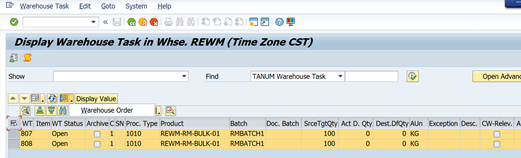

Step 5: Display inbound delivery goods movements status after goods receipt


Step 6: Confirm put-away task


Conclusion
Bulk storage put-away rules decide how and where pallets are placed in bulk storage locations to maximize space, ensure safety, and streamline picking operations.
Credit
To write this blog was inspired by Mr. Naidu's EWM trainer live session recorded videos.
Rajesh Sharma
SAP WM/EWM Functional Consultant
§ Linked in profile: https://www.linkedin.com/in/rajesh-sharma-204910278/
§ Twitter: RajeshS98151512/ RAJESH SHARMA@RAJESHS21287609
§ SAP Blogs: https://www.sastrageek.com/blog


I started paying attention to how different interfaces affect my decision-making speed, especially when I’m switching between work, social media, and other online environments. During that observation, https://the-aviator.net/ came up as another reference point in understanding how timing and anticipation influence attention. I realized that my concentration changes depending on how quickly a system responds to input, almost like my brain recalibrates itself to match the rhythm. At times, this creates a sense of sharp focus, while at other times it leads to scattered attention if I stay too long. These shifts made me more aware of how design choices can subtly shape behavior without explicit instruction.
Cars and auto racing have always held a special place in gaming culture. From early arcade titles to modern hyper-realistic simulators, the appeal is obvious: speed, competition, precision, and that constant adrenaline rush. But what often gets overlooked is just how complex it is to actually build a racing game that feels right. This is where the approach taken by VSQUAD Studio becomes worth discussing.