Configuration steps for Pick HU
- Rajesh Sharma

- Aug 16, 2025
- 2 min read


Pick HU in the Configuration steps for the outbound process in SAP S/4HANA EWM
This blog states the pick HU configuration steps in SAP S/4HANA Extended Warehouse Management
In SAP S/4HANA Extended Warehouse Management (EWM), the "Pick HU" (Handling Unit) process is used to efficiently manage picking by consolidating picked items into HUs (like cartons, pallets, or bins) during the picking operation. This helps streamline outbound processing, especially in high-volume or complex warehouse environments.
What is "Pick HU" in EWM?
A Pick HU is a handling unit created or used during the picking process to collect items that are being picked for an outbound delivery. This HU can then be moved to staging, loaded, and shipped, reducing handling and errors.

Step 1: Define warehouse order creation rule
SPRO> SAP IMG Screen> SCM EWM> Extended warehouse management> Cross process settings> Warehouse order> Define warehouse order creation rules
Step 2: Define filtration for the warehouse order creation rule
SPRO> SAP IMG Screen> SCM EWM> Extended warehouse management> Cross process settings> Warehouse order> Define filtration for warehouse order creation rule
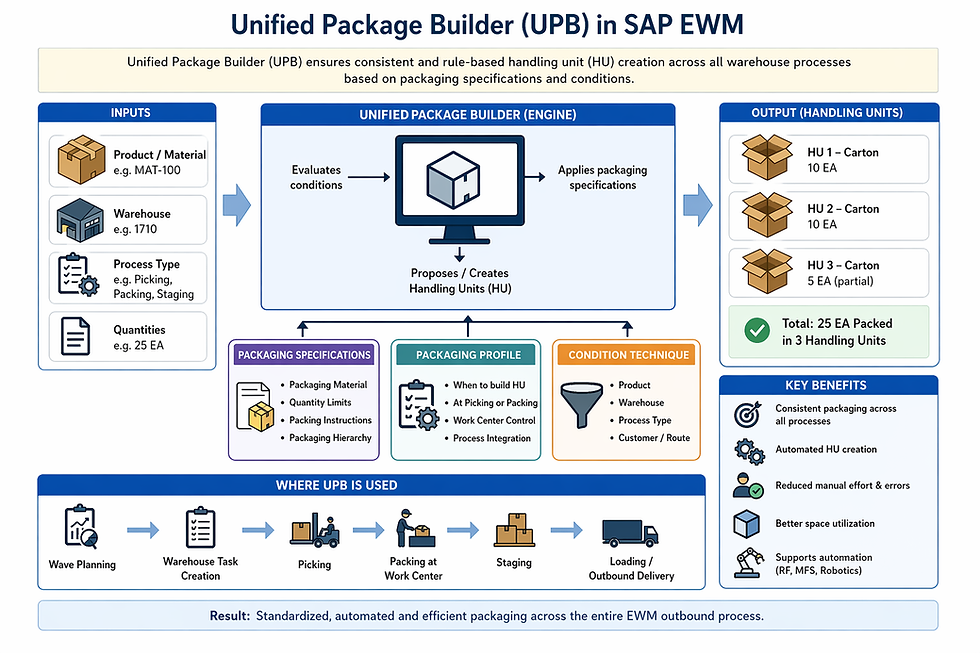
Step 3: Define packaging profile
SPRO> SAP IMG Screen> SCM EWM> Extended warehouse management> Cross process settings> Warehouse order> Define packaging profile
Step 4: Define search sequence for warehouse order creation rule
SPRO> SAP IMG Screen> SCM EWM> Extended warehouse management> Cross process settings> Warehouse order> Define search sequence warehouse order creation rules
Step 5: Define warehouse process type for Pick HU
SPRO> SAP IMG Screen> SCM EWM> Extended warehouse management> Cross process settings> Warehouse task> Define warehouse task

Step 6: Assign pick HU warehouse process type, warehouse number control
SPRO> SAP IMG Screen> SCM EWM> Extended warehouse management> Master data> Warehouse number control
Step 7: Create a Virtual storage bin for the activity area
T-code: /N/SCWM/LS01
Step 8: Define layout-oriented storage process control
SPRO> SAP IMG Screen> SCM EWM> Extended warehouse management> Cross process settings> Warehouse task> Define layout oriented storage process control
Assign a virtual storage bin and, warehouse process type to the activity area
Step 9: Maintain the attribute in the activity area
T-code: /N/SCWM/SEBA
Step 10: Maintain packaging specification for packaging profile
T-code: /N/SCWM/PACKSPEC
Conclusion
Pick HU is a beneficial functionality in SAP EWM.
Credit
This blog was inspired by Mr. Naidu's EWM trainer live session recorded videos.
Rajesh Sharma
SAP WM/EWM Functional Consultant
§ Linked in profile: https://www.linkedin.com/in/rajesh-sharma-204910278/
§ Twitter: RajeshS98151512/ RAJESH SHARMA@RAJESHS21287609
§ SAP Blogs: https://www.sastrageek.com/blog




Có lần mình nghiên cứu luck8.company chủ yếu từ góc độ tài khoản và dữ liệu thay vì trò chơi. Nền tảng đề cập đến việc hạn chế truy cập trái phép, đồng thời khuyến nghị thành viên chủ động bảo vệ mật khẩu và OTP. PCI DSS cũng xuất hiện trong nhóm tiêu chuẩn liên quan đến thanh toán trực tuyến. Sau khi xem những phần này, mình mới chuyển sang bắn cá rồi mở thêm Roulette. Với mình, lớp bảo vệ phía sau khá quan trọng vì nó liên kết trực tiếp với giao dịch, tài khoản và cả quá trình nhận hỗ trợ khi có tình huống cần xử lý.
Khi tìm hiểu Hi88 , mình muốn xem cách nền tảng duy trì sự thuận tiện khi người dùng thay đổi giữa các nhóm nội dung. Mình bắt đầu với thể thao để quan sát cách các sự kiện được phân chia, sau đó chuyển sang bắn cá và xổ số để so sánh trải nghiệm. Game bài cũng được mở thêm nhằm xem cách một danh mục quen thuộc được đặt trong tổng thể hệ thống. App giúp quá trình truy cập trên điện thoại linh hoạt hơn. Theo mình, một nền tảng có nhiều lựa chọn cần giữ được sự kết nối giữa từng khu vực để người dùng dễ dàng thay đổi nhu cầu mà không cảm thấy…
Thay vì tìm một trò chơi cụ thể, mình chọn khám phá Hi88 theo cách khá đơn giản là thao tác qua nhiều khu vực khác nhau. Mình mở live casino rồi chuyển sang mục giao dịch để xem việc chuyển đổi có mượt hay không. Sau vài lần thử, mình thấy giao diện vẫn giữ được cách hiển thị quen thuộc và các chức năng phản hồi khá ổn định. Với mình, cảm giác sử dụng liền mạch luôn quan trọng hơn việc có quá nhiều nội dung trên cùng một màn hình.
Ở góc bảo mật của QQ88 , mình muốn nhìn kỹ hơn vào việc giao dịch được kiểm tra qua nhiều lớp trước khi hoàn tất. Cách vận hành này kết hợp với SSL 128-bit và 2FA, tạo thành một chuỗi bảo vệ từ dữ liệu đến tài khoản. Mình thấy lớp kiểm tra giao dịch đặc biệt liên quan đến những thao tác nạp rút thường xuyên hơn là chỉ mang ý nghĩa kỹ thuật. Phần giải trí mình trải nghiệm Fantan rồi chuyển sang bắn cá. Sảnh thể thao có đua ngựa với dữ liệu tỷ lệ riêng. Theo mình, bảo mật dễ tạo cảm giác liền mạch hơn khi được tích hợp phía sau các thao tác quen…
Từ góc độ trải nghiệm di động, new888 cho mình thấy app là một lớp vận hành khá quan trọng. Ứng dụng tích hợp các khu như thể thao, casino live, slot, bắn cá và xổ số, nên người dùng có thể thao tác trong một không gian thống nhất. Mình thử nhìn hiệu suất nhanh hơn bản web mobile như một điểm giúp trải nghiệm nhẹ hơn. Không lo chặn link hay lỗi kết nối cũng làm quá trình dùng ổn định hơn. Ngoài ra, thông báo tin tức và khuyến mãi giúp người dùng theo dõi kịp thời. Với mình, app hiệu quả là app giữ được sự liền mạch giữa truy cập và thao tác.