Purchase Order Release Strategies
- Rajesh Sharma

- Jan 26, 2025
- 2 min read


Purchase Order Release Strategy
This blog will discuss the purchase order release strategy in SAP S/4HANA.
Overview
Release Procedures (approval) can be used for Purchase Orders (PO). The principle is the same for all. If you can master one, you will know them all.
Key terminology
Release Codes - The different levels that the approval will go through.
Release Groups - Grouping of strategies.
Release Strategy - Unique, set of conditions, sequence, and levels of releases.
Release Indicator / Status – Purchase Order status as it moves through the strategy. Example ‘Block’ (can’t create PO yet) or ‘Final Release’ (can create PO)
Here is a summary of the steps to follow to set up our example:
Create Characteristics & link to comm. structure (CEKKO for PO)
Create a Class & link to the characteristic
Create Release Groups & link to the class
Create Release Codes
Release Indicator
Set up strategies
Strategies & Codes
Pre-requirements
Status
Assign values for strategies
Set overall / item for doc type
Create and allocate authorization profiles
Detail Steps of Settings
1. Create Characteristics and link to communication structure
1.1 Display CEKKO Table

Step 1: Enter Data Base Table CEKKO, and display


1.2 Define Characteristics


Define Class

Step 1: Enter Class. Description, and class type


Define Document Type for Purchase Order


Set Release Procedure

Release Group

Define codes

Release indictor
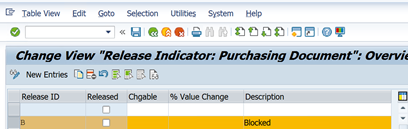

Release Strategy R1 -1 0.00 to 1000 USD

Release Prerequisites

Release Status

Classification

Release Simulation

Simulate Release


Release Strategy R2 >1001 USD

Release Prerequisites

Release status

Classification

Release Simulation

Simulate Release


Work flow

Testing Purchase Order Release Strategy R1- PO Price less than 1000 USD
5.1 Create Purchase Order

Step 1: Enter Vendor, Purchase Org., Purchase Group, Company Code

Step 2: Enter Material, Quantity, Plant, and Save

Purchase Order 4500005939 Created
5.2 Release Purchase Order

Step 1: Click on Document, Enter the PO Number, and Execute

PO Value is less than 1000 USD so R1 Release Strategy Triggered
Step 2: Release by Creator

Step 3: Click on Release by Purchase Officer

Step 4: Save

Testing Purchase Order Release Strategy R1- PO Price More than 1000 USD
6.1 Create Purchase Order

Step 1: Enter Vendor, Purchase Org, Purchasing Group, Company Code

Step 2: Enter Material, Quantity, Plant, and Save

Purchase Order 4500005940 created


6.2 Release Purchase Order

Step 1: Click on Document, Enter PO Number, Execute

Because PO Value is more than 1000 USD, so Release Strategy R2 Triggered, 3 level Approval required

Step 2: Release by Creator

Step 3: Release by Purchase Officer

Step 4: Release by Purchase Manager and save

Conclusion
Here we understand how the purchase order release strategy is configured in SAP S/4HANA.
Rajesh Sharma
SAP WM/EWM Functional Consultant
§ Linked in profile: https://www.linkedin.com/in/rajesh-sharma-204910278/
§ Twitter: RajeshS98151512/ RAJESH SHARMA@RAJESHS21287609
§ SAP Blogs: https://www.sastrageek.com/blog




Mình có lần lướt đọc mấy trao đổi trên mạng شيخ روحاني thì thấy nhắc nên cũng tò mò mở ra xem thử cho biết. Mình không tìm hiểu sâu جلب الحبيب chỉ xem qua trong thời gian ngắn để quan sát bố cục جلب الحبيب cách sắp xếp شيخ روحاني các mục và trình bày nội شيخ روحاني dung tổng thể. Cảm giác là các phần được trình bày khá gọn, các Berlinintim mục rõ ràng nên đọc lướt cũng không bị rối Berlinintim với mình như شيخ روحاني vậy là đủ để nắm tin cơ bản rồi. جلب الحبيب
😘
Bookmark this: https://TechyQuant.com/ – because smart tech deserves smart readers.
Great work by the RS Digital Services team – combining creativity with performance-based marketing! Visit: https://rsdigitalservices.com/
SALJU777
SALJU777
SALJU777
SALJU777
SALJU777 LOGIN
SALJU777 LOGIN
SALJU777 LOGIN
SALJU777 LOGIN
SALJU777 DAFTAR
SALJU777 DAFTAR
SALJU777 DAFTAR
SALJU777 DAFTAR
SALJU777 LINK ALTERNATIF
SALJU777 LINK ALTERNATIF
SALJU777 LINK ALTERNATIF
SALJU777 LINK ALTERNATIF
SALJU777 GACOR
SALJU777 GACOR
SALJU777 GACOR
LOGIN SALJU777
LOGIN SALJU777
LOGIN SALJU777
DAFTAR SALJU777
DAFTAR SALJU777
DAFTAR SALJU777